
A Spotlight Campaign is billed per click. You only pay when donors actually engage with your campaign, and a cost cap makes sure you never spend more than you agreed.
What’s included in your Spotlight booking
Every Spotlight booking consists of two placements:
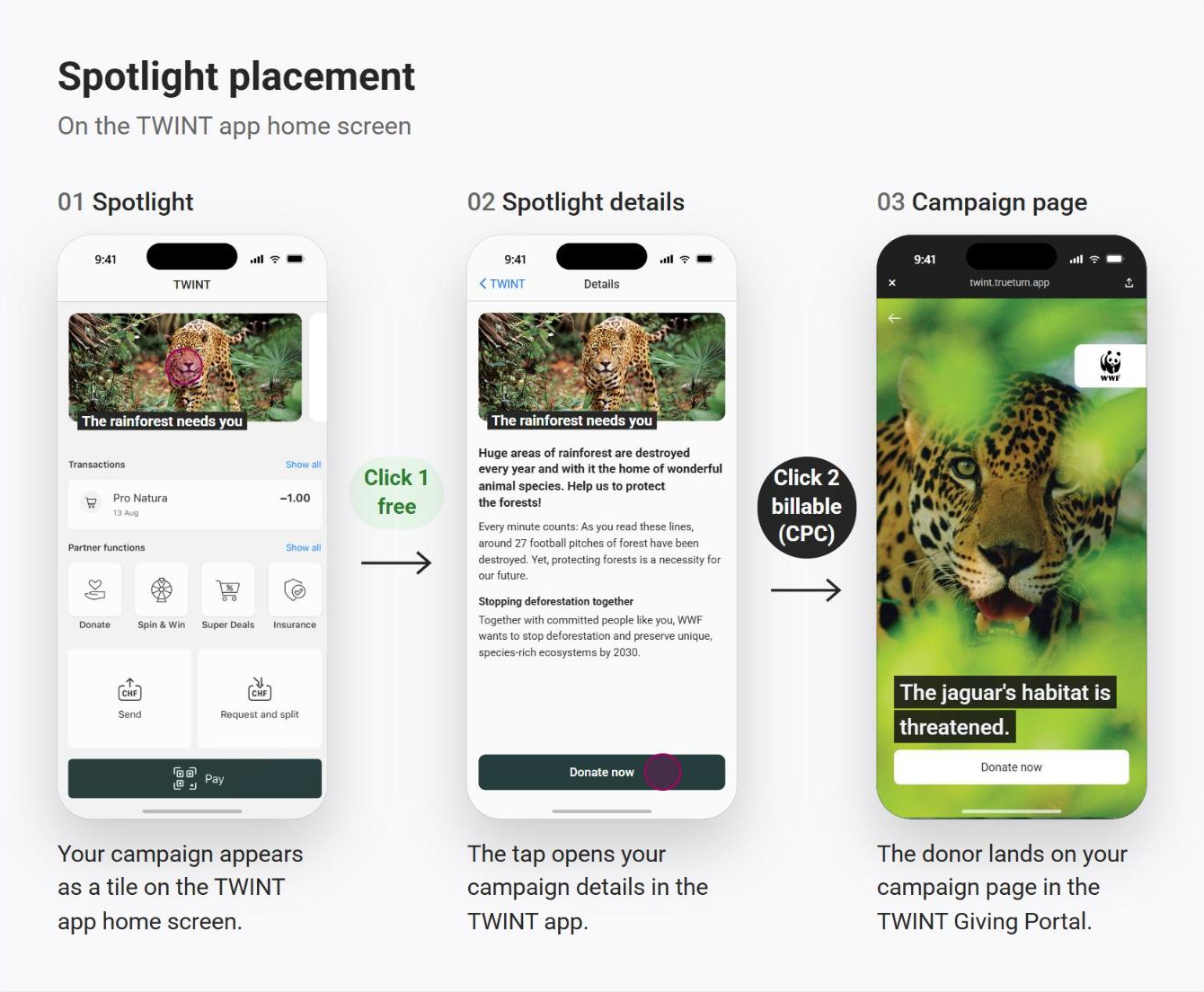
- Spotlight placement (2 weeks): Your campaign appears as a tile in the top section of the TWINT app home screen.
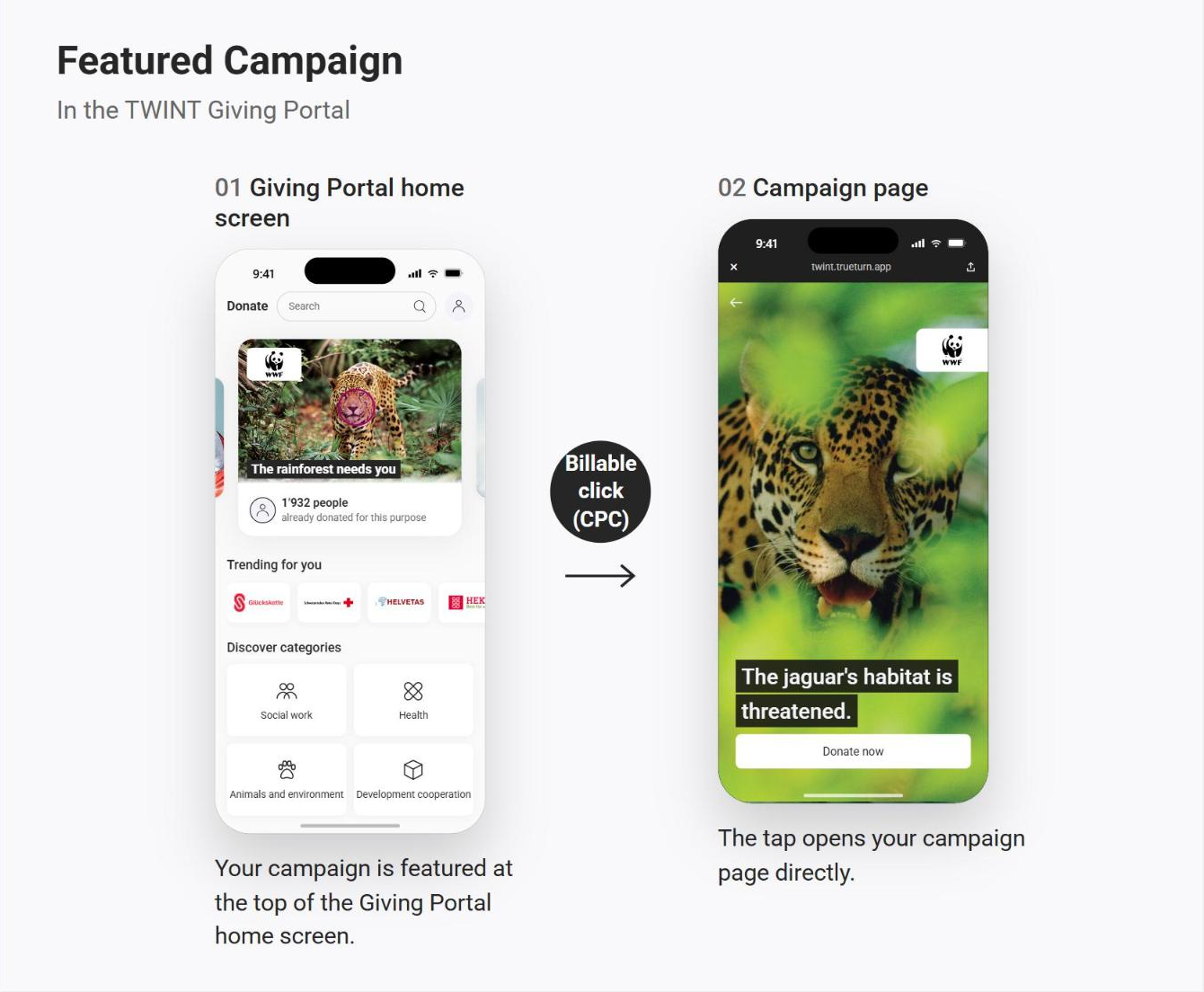
- Featured Campaign (4 weeks): Your campaign is also shown in the teaser section of the TWINT Giving Portal (TWINT app › Partner functions › “Donations”). This placement is part of your Spotlight booking.
Different durations are possible upon agreement. The exact dates are set out in your service agreement.
What you pay for
- Setup fee: a one-time fee per Spotlight booking
- Spotlight details clicks: the agreed cost per click (CPC) for each billable click on your Spotlight
- Featured Campaign clicks: the agreed cost per click for each click on the Featured Campaign included in your booking
Pricing is agreed individually when you book your Spotlight Campaign and is set out in your service agreement, together with the estimated number of clicks. All costs count towards one shared cost cap. All fees are excluding VAT.
What counts as a billable click
- Spotlight: The first tap, on your Spotlight tile in the TWINT app, is free of charge. From the second tap on (“Donate now” in your campaign details), the agreed cost per click applies.
- Featured Campaign: Every tap on your campaign in the TWINT Giving Portal is billed at the agreed cost per click.
- Clicks by TrueTurn employees for testing purposes are never charged.
How the cost cap protects your budget
Before your Spotlight Campaign starts, we agree on a cost cap: the maximum amount you’ll be charged for the whole booking.
- You stay informed: From the day your Spotlight goes live, we keep you updated on the current cost status.
- Early warning: If it looks like the cost cap will be reached, we let you know in advance.
- No surprises: Once the cost cap is reached, the campaign only continues if you approve an additional budget. If you don’t, the campaign is paused and you won’t be charged anything beyond the cap.
- Flexible budget: If one item (e.g. Spotlight clicks) uses more than planned but the overall cost cap isn’t reached, the budget is reallocated and your campaign keeps running.
Additional or changed services you order after signing aren’t covered by the cost cap and are billed separately.
Placement and performance
- On launch day, your Spotlight appears with high priority. After that, its placement depends on other campaigns and on user behaviour.
- The Featured Campaign is displayed in random order in the teaser section of the TWINT Giving Portal.
- We can’t guarantee a specific number of impressions, clicks or donations.
Invoicing and payment
You’ll receive one invoice after your Spotlight Campaign ends. It covers the setup fee and all billable clicks up to the cost cap. Invoices are payable within 30 days.
Before you start
- Your organisation must be listed on the TWINT Giving Portal with a National or Emergency package.
- Your campaign materials must meet our specifications, see the image requirements for Spotlight campaigns. TrueTurn may reject materials.
Questions about pricing or your Spotlight budget? Contact us at support@trueturn.com.